

Hemingway Editor
Writing editor that flags long sentences, passive voice and complex words
Introduction
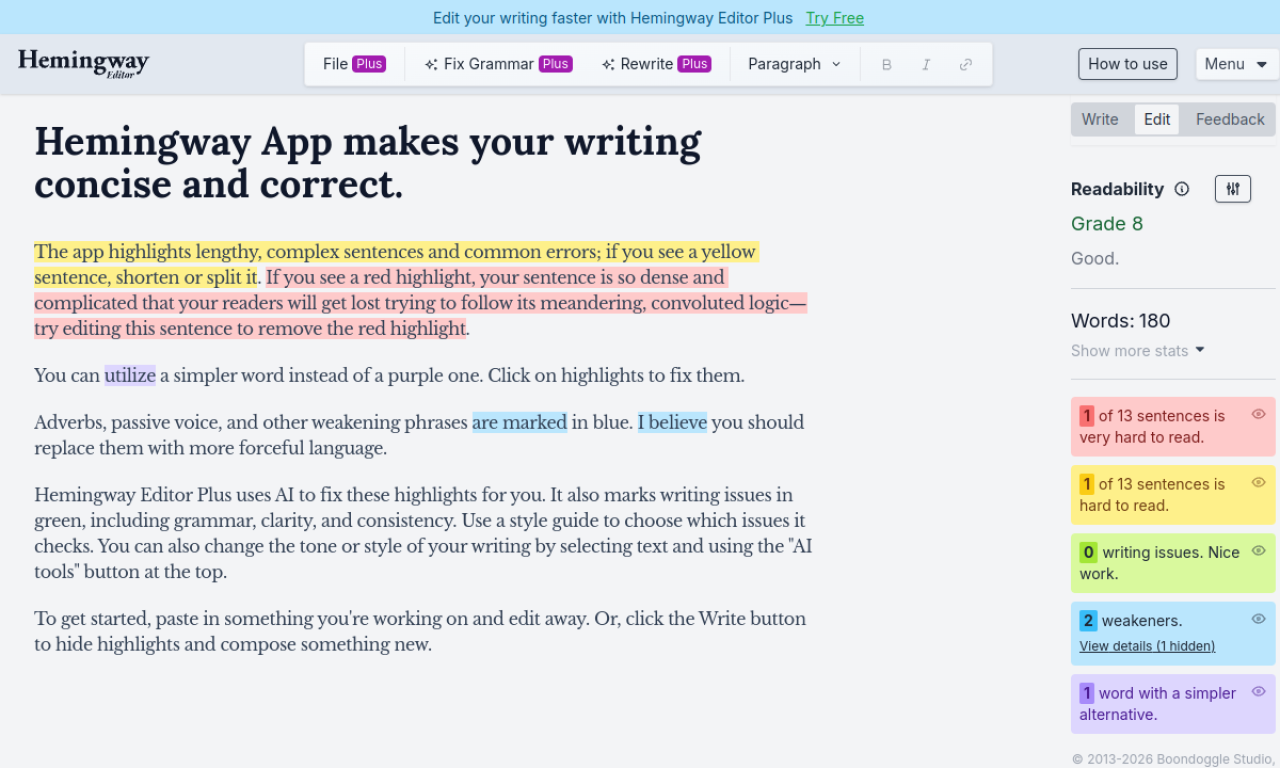
Hemingway Editor highlights hard-to-read sentences, adverbs, passive voice and complex words so your writing is clearer. A free online version exists, while the paid Plus plan adds AI fixes, grammar checking and tone changes.
- Added on
- Nov 2, 2026
- Website
- hemingwayapp.com
- Pricing model
- Free Trial
- Company
- .38 Long LLC
Product information
What is Hemingway Editor?
Hemingway Editor is a tool for bold, clear writing. It color-codes long sentences, dense text, simpler word choices and weak phrasing, and shows a readability grade level.
How to use Hemingway Editor?
Paste your text into the editor and review the highlights. Click one to see suggestions, or press Write to hide highlights and draft new text.
Core features of Hemingway Editor
- Flags long, complex sentences
- Marks adverbs and passive voice
- Suggests simpler words
- AI grammar checker in Plus
- Readability grade level
Use cases of Hemingway Editor
- 1Make articles clearer and tighter
- 2Improve readability of academic papers
- 3Polish marketing copy
- 4Refine blog posts
- 5Strengthen business writing
Frequently asked questions about Hemingway Editor
What do the highlight colors mean?+
Yellow means shorten or split, red means too dense, purple suggests simpler words, and blue marks adverbs, passive voice and weak phrases.
Is there a free version of Hemingway Editor?+
Yes, there is a free online version.
What is Hemingway Editor Plus?+
A paid service that uses AI to fix highlights, adds an advanced grammar checker and can change tone or style.
Which category is Hemingway Editor in?+
Hemingway Editor is listed under AI Writing Assistant, AI Grammar Checker.